How to Transfer an App to Another Google Play Account
The process itself takes ten minutes. Finding the one number Google asks for can take an afternoon of digging through old email. Here is the whole thing, including the part that catches everyone.
The transfer itself is a short form. Open the Play Console, enter three numbers, submit. Google replies within two business days and the app moves with its reviews, ratings and install base intact.
The part nobody warns you about is one of those three numbers. Google asks for the registration transaction ID of both accounts, which is the order ID from the $25 payment made when each account was first created. For an account set up years ago by someone who may have left the company, that number is sitting in an old inbox, and finding it takes longer than the rest of the process combined.
We have run this transfer for client apps. Below is the whole sequence, with the transaction ID hunt covered properly.
What do you need before you start?
Five things. Gather all of them before you open the form, because a half-finished request is worse than no request.
Both accounts active and in good standing. Neither can be showing a "Why can't I publish" warning, and all apps being moved must comply with policy.
The target account's developer ID. A long number visible in the Play Console URL of the receiving account.
Your registration transaction ID. From your own account's original $25 payment.
The target account's registration transaction ID. Same thing, from their side. You will need to ask them for it.
A payment profile on the target account, if the app is paid or sells anything.
Download your reports first. Bulk export, payout and earnings reports do not move with the app, and once the transfer completes you cannot go back for them.
Where do you find the transaction ID?
In the account owner's email, or in Google Payments. This is the step that turns a ten-minute job into an afternoon.
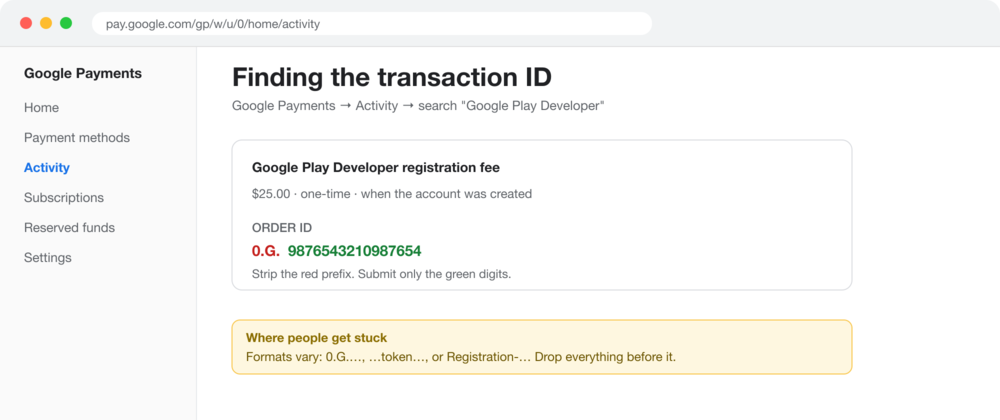
Search the inbox of whoever created the account for "developer registration fee". If that fails, sign in to Google Payments, open Activity, and search for "Google Play Developer". The charge is $25, one-time, dated whenever the account was created.
The order ID has a prefix. Google wants only the digits after it.
Then the detail that causes most rejected requests: strip the prefix. Order IDs come in a few shapes, and you submit only the part after the prefix.
0.G.9876543210987654 becomes 9876543210987654
An ID containing token — discard everything before that word
Registration-1234ab56-7c89 — discard everything before the digits
If the person who set up the account has left, this is a real blocker rather than an inconvenience. Whoever now controls that mailbox needs to search it, or the account owner needs to pull the record from Google Payments.
How do you submit the transfer request?
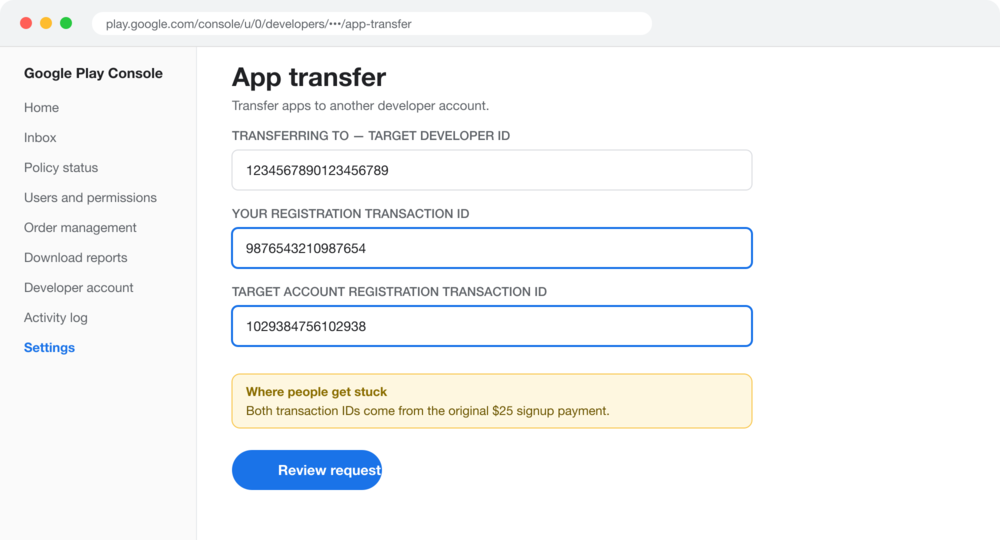
Play Console → Settings → App transfer, from the account that currently owns the app. The form asks for the target developer ID and both transaction IDs, plus a reason for the transfer and your business relationship to the receiving party.
The transfer form. Both transaction ID fields are the ones that fail if the prefix is left in.
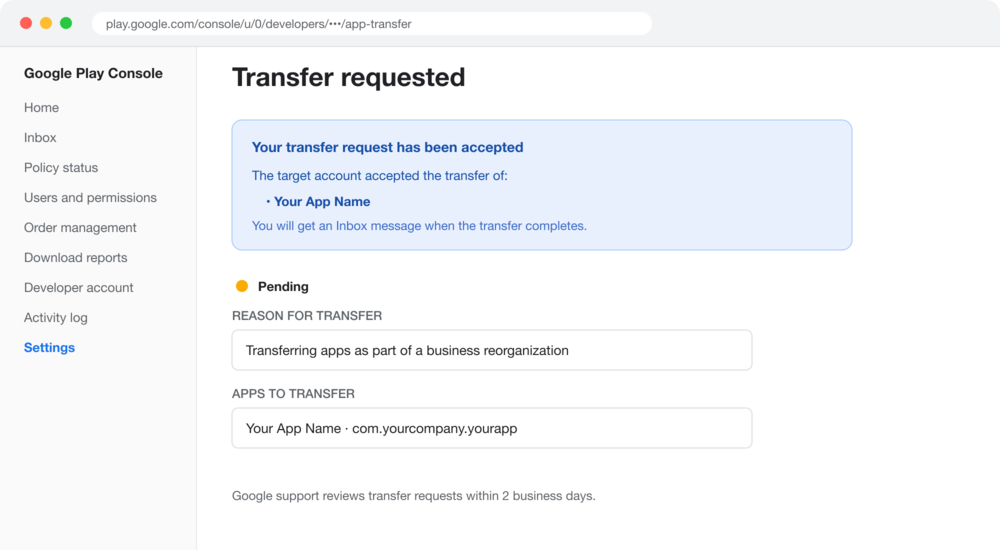
Pick the apps to move, submit, and the request goes to the receiving account to accept. Once they accept, it sits as Pending while Google reviews.
After the target account accepts, the request stays Pending until Google completes the move.
How long does it take?
Google reviews within two business days. End to end, a few days is normal once the paperwork is right. The app stays live throughout. Users do not see anything change, reviews and ratings survive, and updates keep flowing.
What usually goes wrong?
Problem 01
The transaction ID cannot be found
The account was created years ago, possibly by a contractor or a founder who has since left, and nobody knows which inbox holds the receipt. Without it the transfer cannot proceed at all.
This is the single most common reason a transfer stalls, and it is entirely an email archaeology problem rather than a technical one.
What to do: Start here, not last. Find both transaction IDs before touching the form, and allow days rather than minutes.
Problem 02
The prefix was left in the ID
The request is submitted with the full order ID including its 0.G. or token or Registration prefix, and it fails verification.
The error message does not always make it obvious that formatting is the problem, so people re-check the number itself rather than the shape of it.
What to do: Submit only the digits after the prefix. If the request bounces and the number looks right, this is almost always why.
Problem 03
Connected services quietly break
Firebase, Analytics, AdMob and any ad SDKs are linked to the old account, not to the app. They do not follow it across and they do not warn you.
The app keeps working for existing users, so the breakage shows up later as missing analytics or stalled ad revenue rather than as an outage.
What to do: List every connected service before the transfer and re-link each one on the new account immediately after.
What does not transfer?
The listing, reviews, ratings, install base and update channel all survive. These do not:
Reports. Bulk export, payout and earnings reports stay with the old account. Download them first.
Test groups. Recreate them on the new account.
Promotions and their settings.
Integrated services. Firebase, Analytics, AdMob and ad SDK links all need redoing by hand.
One structural limit: private apps created through the managed Google Play iFrame cannot be transferred at all.
"The form takes ten minutes. Finding a receipt from an account somebody set up four years ago is the actual project."
What about the iOS side?
If you are moving a product between companies you almost certainly need to move both stores, and Apple's process is a different shape. It has no transaction ID, but it has a much longer list of things that block a transfer outright, including TestFlight, Xcode Cloud data and Apple Pay merchant IDs. It is a different process, and we have written it up separately.
Google PlayApp TransferAndroidGuide
J
We can run the transfer for you
Both stores, the paperwork, and the connected services relinked on the other side. You keep your reviews and your install base.